Subdomains can point to different sections of your web-site.
In order to create a subdomain in your cPanel account, please, follow the next steps:
1) Log in your cPanel
2) Navigate to the menu ‘Subdomains’ under the ‘Domains’ section 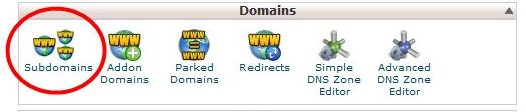
3) Enter the following details for your subdomain:
Subdomain: the name of your subdomain
Choose the domain you need to create a subdomain for from the drop-down menu
Document Root: the root directory for your subdomain ( for example, it can be /public_html/subdomain )
4) Click ‘Create’ 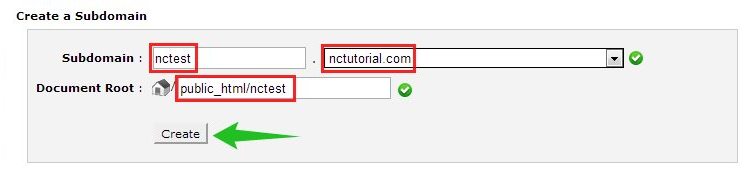
You can also create a wildcard subdomain. Wildcard subdomains allow you to point all the subdomains ( existing and non-existing ) to a specific folder in your account. It means that if you enter any subdomain in your browser ( for example, test.domain.com – not existing, or blog.domain.com – existing), it will show the same content that you uploaded to the folder for the wildcard subdomain.
In order to create it, please, follow the instructions.